Yale YDM7220 Smart Mortice Lock with Home Module Matt Black
Yale YDM7220 Smart Mortice Lock
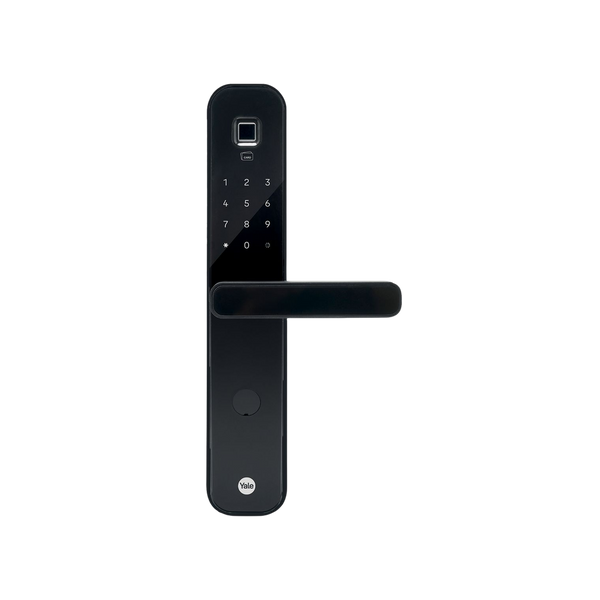
The Yale YDM7220 is Mortice Smart Lock, a smart and extremely convenient solutions for your home.
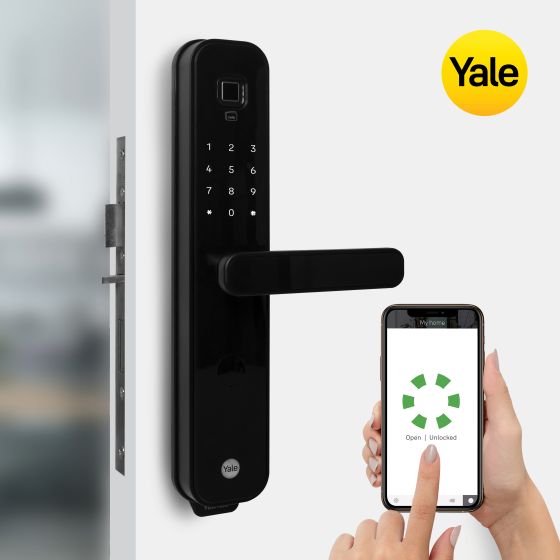
The Yale YDM7220 smart lock is a smart and extremely convenient solutions for your home. You can have all the various access option to enter your home either via fingerprint scan, personalized PIN code, RFID key tag or simply via your phone.
Features
Yale takes the next step in providing you peace of mind when securing your belongings with the YDM7220 Smart Mortice Lock. Offering you various door access methods including fingerprint scan, personalised PIN code, RFID key tag or a physical key, there is now even more smart lock options to suit your home needs.
The Yale YDM7220 Smart Mortice Lock has an inbuilt door position sensor that checks the status of whether the door is open or closed. This avoids inadvertently locking your door while the door is open. With the scramble code feature, you can either enter a series of numbers at the beginning or after the pin code to ensure the real pin is not exposed. To ensuring further safety, there is a child safe button on the inside handle which can be enabled, so the button on the inside handle must be depressed for the lever to engage the lock.
The privacy button brings enhanced security to you by disabling authentication methods (pincode, RFID tag, and fingerprints) from outside when you switch ON from inside. You will only be able to use the mechanical key (2 provided) to unlock when the Privacy mode is ON. 9V battery backup terminal is located at the bottom of the lock in case the battery runs flat, though with an audible low battery warning, this will be averted.
The Yale YDM series Rebate kit* offers customers the option to fit this lock with a set of rebated double doors.
Works with your Smart Home. The Yale YDM Home Module (included) allows users with a YDM series lock to utilise the functions and features of the Yale Home App.
Yale Home Features:
- Lock and unlock your door via your mobile device
- Grant access to others for one time access
- Grant access for a set period of time or a date range
- Keep track of visitor access
- Check the door status from your mobile device
- The Yale Connect Plus Bridge is required to enable the Works with Amazon Alexa and Google Home functionality, allowing you to control your lock with voice commands. Upgrade your YDM7220 lock with the Yale Connect Plus Wi-Fi Bridge** (Item code: AYR-BDG-CB2-ANZ, sold separately) to access your lock remotely, enjoy the full benefits through the Yale Home App, and seamlessly integrate voice commands with Alexa, Siri and Google Assistant.
**Yale Connect Plus Wi-Fi Bridge is required and sold separately
Buildmat is offering Free Shipping Australia Wide on kitchen sinks.
Buildmat offers free shipping for all orders over $100.
All our orders are shipped from our Melbourne warehouse and are dispatched next business day.
Shipping time estimates are listed below. if you're really worried about delivery times feel free to call us and we can give you a more accurate estimate and also let you know who our courier for your area is.
Smart door locks give you keyless convenience and modern security. Here's how to choose the right one for your home.
1. Decide how you want to unlock your door
Smart door locks offer different ways to get in:
- Keypad/PIN code: Enter a code to unlock – simple and reliable, no phone needed.
- Phone app: Unlock with your smartphone via Bluetooth or Wi-Fi – convenient when your hands are full.
- Fingerprint scanner: Touch to unlock – fast and secure, best for families.
- Physical key backup: Most smart locks still include a traditional key option in case of battery failure or tech issues.
Choose based on what feels most natural for how you and your family come and go.
2. Think about who needs access
Smart locks let you create temporary codes for guests, cleaners, or trades that expire automatically. You can give kids their own codes and change them anytime. Some systems let you track who unlocked the door and when helpful for families with teenagers or rental properties.
3. Check battery life and power
Most smart locks run on batteries (usually AA or rechargeable) that last 6–12 months. Look for low-battery warnings that give you plenty of notice before they die. Some models have backup power ports so you can jump-start them with a power bank if batteries fail while you're locked out.
4. Make sure it fits your door
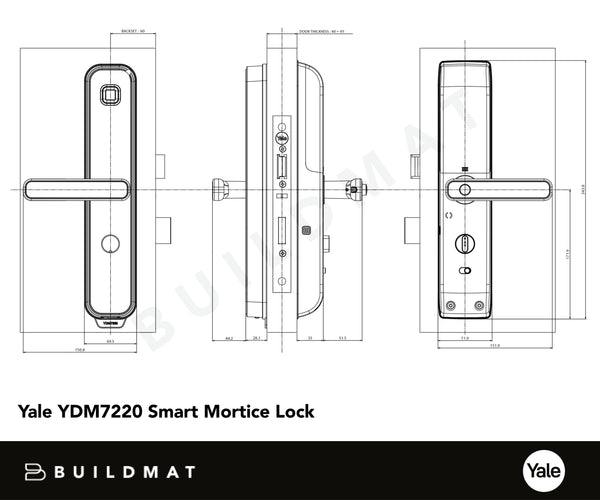
Check your door thickness (usually 35mm–45mm in Australia), backset distance (60mm is standard), and whether you have a deadbolt or latch. Some smart locks replace your entire lock, others fit over existing deadbolts. Measure before you buy to avoid compatibility issues.
5. Think about security features
Look for locks with:
- Auto-lock: Automatically locks after a set time – great if you forget to lock up.
- Tamper alerts: Notifications if someone tries to force the lock.
- Scramble keypad: Randomises the number layout to prevent people seeing which numbers you press.
- Australian Standards compliance: Check for AS4145 certification for peace of mind.
5. Consider installation
Some smart locks are DIY-friendly if you're handy with a screwdriver. Others need professional installation, especially if you're replacing the entire lock or adding new hardware. Check what's involved before you buy as installation can add $100–$300 to the total cost.
6. Set your budget
Smart door locks typically range from $250–$600+ depending on features, connectivity, and brand. Basic keypad models start lower, while full-featured locks with biometric scanning, Wi-Fi, and smart home integration sit at the higher end. Factor in installation costs if you're not doing it yourself.
Need help choosing?
Browse our full range of smart door locks and door hardware to find the perfect keyless entry solution for your home.
Yale YDM7220 Smart Mortice Lock
The Yale YDM7220 is Mortice Smart Lock, a smart and extremely convenient solutions for your home.
The Yale YDM7220 smart lock is a smart and extremely convenient solutions for your home. You can have all the various access option to enter your home either via fingerprint scan, personalized PIN code, RFID key tag or simply via your phone.
Features
Yale takes the next step in providing you peace of mind when securing your belongings with the YDM7220 Smart Mortice Lock. Offering you various door access methods including fingerprint scan, personalised PIN code, RFID key tag or a physical key, there is now even more smart lock options to suit your home needs.
The Yale YDM7220 Smart Mortice Lock has an inbuilt door position sensor that checks the status of whether the door is open or closed. This avoids inadvertently locking your door while the door is open. With the scramble code feature, you can either enter a series of numbers at the beginning or after the pin code to ensure the real pin is not exposed. To ensuring further safety, there is a child safe button on the inside handle which can be enabled, so the button on the inside handle must be depressed for the lever to engage the lock.
The privacy button brings enhanced security to you by disabling authentication methods (pincode, RFID tag, and fingerprints) from outside when you switch ON from inside. You will only be able to use the mechanical key (2 provided) to unlock when the Privacy mode is ON. 9V battery backup terminal is located at the bottom of the lock in case the battery runs flat, though with an audible low battery warning, this will be averted.
The Yale YDM series Rebate kit* offers customers the option to fit this lock with a set of rebated double doors.
Works with your Smart Home. The Yale YDM Home Module (included) allows users with a YDM series lock to utilise the functions and features of the Yale Home App.
Yale Home Features:
- Lock and unlock your door via your mobile device
- Grant access to others for one time access
- Grant access for a set period of time or a date range
- Keep track of visitor access
- Check the door status from your mobile device
- The Yale Connect Plus Bridge is required to enable the Works with Amazon Alexa and Google Home functionality, allowing you to control your lock with voice commands. Upgrade your YDM7220 lock with the Yale Connect Plus Wi-Fi Bridge** (Item code: AYR-BDG-CB2-ANZ, sold separately) to access your lock remotely, enjoy the full benefits through the Yale Home App, and seamlessly integrate voice commands with Alexa, Siri and Google Assistant.
**Yale Connect Plus Wi-Fi Bridge is required and sold separately
Buildmat is offering Free Shipping Australia Wide on kitchen sinks.
Buildmat offers free shipping for all orders over $100.
All our orders are shipped from our Melbourne warehouse and are dispatched next business day.
Shipping time estimates are listed below. if you're really worried about delivery times feel free to call us and we can give you a more accurate estimate and also let you know who our courier for your area is.
Smart door locks give you keyless convenience and modern security. Here's how to choose the right one for your home.
1. Decide how you want to unlock your door
Smart door locks offer different ways to get in:
- Keypad/PIN code: Enter a code to unlock – simple and reliable, no phone needed.
- Phone app: Unlock with your smartphone via Bluetooth or Wi-Fi – convenient when your hands are full.
- Fingerprint scanner: Touch to unlock – fast and secure, best for families.
- Physical key backup: Most smart locks still include a traditional key option in case of battery failure or tech issues.
Choose based on what feels most natural for how you and your family come and go.
2. Think about who needs access
Smart locks let you create temporary codes for guests, cleaners, or trades that expire automatically. You can give kids their own codes and change them anytime. Some systems let you track who unlocked the door and when helpful for families with teenagers or rental properties.
3. Check battery life and power
Most smart locks run on batteries (usually AA or rechargeable) that last 6–12 months. Look for low-battery warnings that give you plenty of notice before they die. Some models have backup power ports so you can jump-start them with a power bank if batteries fail while you're locked out.
4. Make sure it fits your door
Check your door thickness (usually 35mm–45mm in Australia), backset distance (60mm is standard), and whether you have a deadbolt or latch. Some smart locks replace your entire lock, others fit over existing deadbolts. Measure before you buy to avoid compatibility issues.
5. Think about security features
Look for locks with:
- Auto-lock: Automatically locks after a set time – great if you forget to lock up.
- Tamper alerts: Notifications if someone tries to force the lock.
- Scramble keypad: Randomises the number layout to prevent people seeing which numbers you press.
- Australian Standards compliance: Check for AS4145 certification for peace of mind.
5. Consider installation
Some smart locks are DIY-friendly if you're handy with a screwdriver. Others need professional installation, especially if you're replacing the entire lock or adding new hardware. Check what's involved before you buy as installation can add $100–$300 to the total cost.
6. Set your budget
Smart door locks typically range from $250–$600+ depending on features, connectivity, and brand. Basic keypad models start lower, while full-featured locks with biometric scanning, Wi-Fi, and smart home integration sit at the higher end. Factor in installation costs if you're not doing it yourself.
Need help choosing?
Browse our full range of smart door locks and door hardware to find the perfect keyless entry solution for your home.
This product is Discontinued, View alternative product.
Explore the Yale Locks Collection
You may also like